A blog post has been made explaining the need for stepping in collision detection.
http://www.c3dl.org/index.php/c3dl-dev/collision-detection-updates-and-rationale/
Friday, March 6, 2009

Friday, February 20, 2009
Collision Detection Release 0.6
The blog entry and details for release 0.6 has been posted on the C3DL page, and it can be read through here.
In this blog, I've talked about what was included in the release and explained how to use the collision detection class.
Again, here's the link to the demos created so far for collision detection: http://matrix.senecac.on.ca/~pplam3/
In this blog, I've talked about what was included in the release and explained how to use the collision detection class.
Again, here's the link to the demos created so far for collision detection: http://matrix.senecac.on.ca/~pplam3/
Friday, February 13, 2009
Collision Detection Updates
Again, I have posted my blog on C3DL site. Here's the link to it.
http://www.c3dl.org/index.php/c3dl-dev/collision-detection-updates-demo-pages/
In this blog, I have blogged about what the future plan is for the next release, as well as what's been done since the last release.
The most important part is that I've posted the links to the demo pages again. Here are the links to them.
Basic Demo Page 1
Basic Demo Page 2
Advance Demo Page
All of these and any other future demo pages can be found here: http://matrix.senecac.on.ca/~pplam3/
http://www.c3dl.org/index.php/c3dl-dev/collision-detection-updates-demo-pages/
In this blog, I have blogged about what the future plan is for the next release, as well as what's been done since the last release.
The most important part is that I've posted the links to the demo pages again. Here are the links to them.
Basic Demo Page 1
Basic Demo Page 2
Advance Demo Page
All of these and any other future demo pages can be found here: http://matrix.senecac.on.ca/~pplam3/
Friday, February 6, 2009
Collision Detection Release 0.5
Release 0.5 blog has been posted on the C3DL blog.
http://www.c3dl.org/index.php/c3dl-dev/collision-detection-release-05collision-detection-release-05/
http://www.c3dl.org/index.php/c3dl-dev/collision-detection-release-05collision-detection-release-05/
Wednesday, January 28, 2009
C3DL Project Recap/Updates
I will be posting my blogs on the C3DL site from now on. However, I will be posting the links to those post here so you can still get to those blogs.
Here are a couple blogs I have posted on the C3DL site.
1. This is a complete summary/walkthrough of the picking function done for C3DL.
http://www.c3dl.org/index.php/c3dl-dev/picking-function/
2. Here is the first update for the new project I started working on for this term. This project is adding the collision detection functionality to Canvas 3D.
http://www.c3dl.org/index.php/c3dl-dev/collision-detection-update/
3. Links to sample test pages for collision detection demo.
http://www.c3dl.org/index.php/c3dl-dev/collision-detection-test-pages/
Here are a couple blogs I have posted on the C3DL site.
1. This is a complete summary/walkthrough of the picking function done for C3DL.
http://www.c3dl.org/index.php/c3dl-dev/picking-function/
2. Here is the first update for the new project I started working on for this term. This project is adding the collision detection functionality to Canvas 3D.
http://www.c3dl.org/index.php/c3dl-dev/collision-detection-update/
3. Links to sample test pages for collision detection demo.
http://www.c3dl.org/index.php/c3dl-dev/collision-detection-test-pages/
Thursday, December 11, 2008
0.3 Goals Met - Release
Finally, after all the researching, the math reviews, the discussions, the coding, the testing, the back-tracking, it's ready - 0.3 Release.
Before talking about the final stretch to get the release done, lets see what's actually been done:
Modified the Model.js to include the following 2 functions
o getVertices(): returns the vertices of the object
o getBoundingBox(aabb): Returns an array of the min/max XYZ values for the bounding box after it's been scaled
Made Picking.js
o Disabled right-click menu on canvas
o Creates the mouse vector from the camera to the far clipping plane
- 2 main variables: Mouse Origin and Mouse Direction Vector
o Ray-Bounding Box Intersection Test
- Takes the min/max XYZ values of the bounding box, mouse origin and direction vector
- Returns true if intersect
- Need to transform the mouse origin and direction vector into the object's space before performing test
o Sorts the intersecting objects from closet to furthest from the camera
o Returns an array of object index in the scene
So, to continue from the previous blog, the correct mouse vector has finally been constructed and we've got ourselves a mouse origin and a mouse direction vector. The next part, which is the most important part was to construct a ray-box intersection test. I've found myself 3 different ray-box intersection algorithm and tried to implement them all, but they don't seem to work properly - only works in specific cases.
On Tuesday, went in to work with Andor. We've looked at the codes and did some more research. In the process, I've played around with the transformations and tried the tests again. Finally, it works. So what's been done now, is that I used one of the AABB tests, and to make it work properly, this is what needs to be done:
1) Get bounding box that's axis-aligned (not transformed)
2) Find the inverse of the object's transformation matrix
3) Apply the inverse transformation matrix to the mouse vector (brings the mouse vector into the object's space)
4) Pass in the values into the test
So now I simply run this test through all the objects in the scene and I've got myself a basic picking function. Afterward, I simply sorted the objects from closest to furthest. And to do that, I did some math and calculated the objects distance from the camera position and compared them.
At the end of the picking function, I had it returned an array of index of the objects in the scene.
During today's Skype meeting, I've updated everyone about the progress of the picking and told them where it's at. As it is, with the bounding box test working fine (even when objects are rotates, scaled, or moved the camera around), they are willing to add this into their next release. However, I will try to make this picking function better by implementing the ray-triangle intersection test and hopefully get this finish before their release, if not, they can add it to their next release.
As of now, my 0.3 Release is done, but I will continue to work on it to make it better. And when I get it done, I will post a more updated version of the picking function on the wiki page and have it be included in the next C3DL release.
Before talking about the final stretch to get the release done, lets see what's actually been done:
Modified the Model.js to include the following 2 functions
o getVertices(): returns the vertices of the object
o getBoundingBox(aabb): Returns an array of the min/max XYZ values for the bounding box after it's been scaled
Made Picking.js
o Disabled right-click menu on canvas
o Creates the mouse vector from the camera to the far clipping plane
- 2 main variables: Mouse Origin and Mouse Direction Vector
o Ray-Bounding Box Intersection Test
- Takes the min/max XYZ values of the bounding box, mouse origin and direction vector
- Returns true if intersect
- Need to transform the mouse origin and direction vector into the object's space before performing test
o Sorts the intersecting objects from closet to furthest from the camera
o Returns an array of object index in the scene
So, to continue from the previous blog, the correct mouse vector has finally been constructed and we've got ourselves a mouse origin and a mouse direction vector. The next part, which is the most important part was to construct a ray-box intersection test. I've found myself 3 different ray-box intersection algorithm and tried to implement them all, but they don't seem to work properly - only works in specific cases.
On Tuesday, went in to work with Andor. We've looked at the codes and did some more research. In the process, I've played around with the transformations and tried the tests again. Finally, it works. So what's been done now, is that I used one of the AABB tests, and to make it work properly, this is what needs to be done:
1) Get bounding box that's axis-aligned (not transformed)
2) Find the inverse of the object's transformation matrix
3) Apply the inverse transformation matrix to the mouse vector (brings the mouse vector into the object's space)
4) Pass in the values into the test
So now I simply run this test through all the objects in the scene and I've got myself a basic picking function. Afterward, I simply sorted the objects from closest to furthest. And to do that, I did some math and calculated the objects distance from the camera position and compared them.
At the end of the picking function, I had it returned an array of index of the objects in the scene.
During today's Skype meeting, I've updated everyone about the progress of the picking and told them where it's at. As it is, with the bounding box test working fine (even when objects are rotates, scaled, or moved the camera around), they are willing to add this into their next release. However, I will try to make this picking function better by implementing the ray-triangle intersection test and hopefully get this finish before their release, if not, they can add it to their next release.
As of now, my 0.3 Release is done, but I will continue to work on it to make it better. And when I get it done, I will post a more updated version of the picking function on the wiki page and have it be included in the next C3DL release.
Monday, December 8, 2008
0.3 Progress Update
Why-oh-why must I test my code so much? What happened? Oh nothing....I basically just had to redo whatever I've had for the mouse vector. However, I managed to make the process of calculating the mouse vector in fewer lines and faster time.
You can ignore all the previous calculations like finding the distance of the camera to the close/far clipping plane using trig, scaling the vector by the ratio, calculating inverse matrix, and everything else that's be done before.
Now, everything's simple. 1 simple trig, and a couple of multiplications and divisions, and we're done. So basically, I just scratched what I've done in the past....2 weeks and went back to what I had originally done in the beginning of the project.
1) Find the dimensions of the far clipping plane
2) Find the ratio between the far clipping plane and the canvas window size
3) Finding the x,y coordinates of the mouse on the canvas window relative to the far clipping plane. And use the distance between the camera and the far clipping plane as the z value.
To make the mouse vector be relative to where the camera is, we simply make the viewMatrix of the camera and multiply our mouse vector with it.
So now, wherever I rotate or move my camera to, the mouse vector will always be shooting from what we see from where the camera is to where we see as the far clipping plane in the back of the canvas.
How did this process get simplify to such an extend, I must thank Cathy and our 1 hr discussion we had and all the diagrams we kept drawing on the white board. That discussion really helped me get a clear image of how the 3D world is shown in that 2D canvas window. What was causing the main problem for having the mouse vector always being skewed towards the center, is because we ended up doing multiple matrix transformations. For what we see on the canvas, the 3D space that we see (perspective) has already been skewed (transformed) so it's in a more rectangular form than a triangle, and then flatten before being put on the screen. I've drawn a simple diagram to show what's been done from a bird's eye view(please excuse the poor drawing).
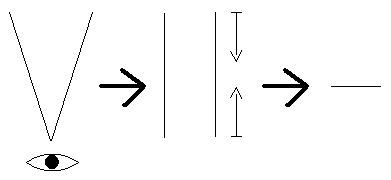
1) What we see in 3D space
2) Skewed (Perspective) and then Compressed
3) 2D (Canvas/Screen)
At least this is my understanding of it. And now that the mouse vector works properly, and FINAL (maybe minor improvements), I have to do the following:
1) Decide on an appropriate intersection test (have 2 right now)
2) Need to aligned mouse vector with testing object before testing intersection
3) Aligned object and mouse vector to axis to perform AABB test (Axis-Aligned Bounding Box)
I hope tomorrow's session with Andor will get these done. And afterward, I want to make the test do a more thorough intersection test rather than just the bounding box.
You can ignore all the previous calculations like finding the distance of the camera to the close/far clipping plane using trig, scaling the vector by the ratio, calculating inverse matrix, and everything else that's be done before.
Now, everything's simple. 1 simple trig, and a couple of multiplications and divisions, and we're done. So basically, I just scratched what I've done in the past....2 weeks and went back to what I had originally done in the beginning of the project.
1) Find the dimensions of the far clipping plane
var farWidth = 2 * ((C3DL_FAR_CLIPPING_PLANE) * Math.tan(degreesToRadians(0.5 * C3DL_FIELD_OF_VIEW)));
var farHeight = farWidth * (tempDiv.height/tempDiv.width);
2) Find the ratio between the far clipping plane and the canvas window size
var wRatio = farWidth / tempDiv.width;
var hRatio = farHeight / tempDiv.width;
3) Finding the x,y coordinates of the mouse on the canvas window relative to the far clipping plane. And use the distance between the camera and the far clipping plane as the z value.
var farX = (currX / tempDiv.width) * farWidth;
var farY = (currY / tempDiv.height) * farHeight;
var farZ = C3DL_FAR_CLIPPING_PLANE - camPos[2];
To make the mouse vector be relative to where the camera is, we simply make the viewMatrix of the camera and multiply our mouse vector with it.
viewMatrix = makePoseMatrix(scn.getCamera().getLeft(), scn.getCamera().getUp(), scn.getCamera().getDir(), scn.getCamera().getPosition());
var tempMouseVec = makeVector(farX, farY, farZ);
tempMouseVec = multiplyMatrixByVector(viewMatrix, tempMouseVec);
So now, wherever I rotate or move my camera to, the mouse vector will always be shooting from what we see from where the camera is to where we see as the far clipping plane in the back of the canvas.
How did this process get simplify to such an extend, I must thank Cathy and our 1 hr discussion we had and all the diagrams we kept drawing on the white board. That discussion really helped me get a clear image of how the 3D world is shown in that 2D canvas window. What was causing the main problem for having the mouse vector always being skewed towards the center, is because we ended up doing multiple matrix transformations. For what we see on the canvas, the 3D space that we see (perspective) has already been skewed (transformed) so it's in a more rectangular form than a triangle, and then flatten before being put on the screen. I've drawn a simple diagram to show what's been done from a bird's eye view(please excuse the poor drawing).

1) What we see in 3D space
2) Skewed (Perspective) and then Compressed
3) 2D (Canvas/Screen)
At least this is my understanding of it. And now that the mouse vector works properly, and FINAL (maybe minor improvements), I have to do the following:
1) Decide on an appropriate intersection test (have 2 right now)
2) Need to aligned mouse vector with testing object before testing intersection
3) Aligned object and mouse vector to axis to perform AABB test (Axis-Aligned Bounding Box)
I hope tomorrow's session with Andor will get these done. And afterward, I want to make the test do a more thorough intersection test rather than just the bounding box.
Subscribe to:
Posts (Atom)